What if AI could run your business?
The first agentic ERP solution from the region, customised 100% for your business.
Scarlett is a business platform with an assistant that works directly with live company data. It prepares the work and moves it forward. The decisions that matter stay with people.
Not another AI tool layered on top of the software you already have.
69 modules across 10 areas, one system underneath. Each module keeps its own tables and reaches everything else by reference: one record per party, one per item, one ledger. Choose an area.
Sales and customers
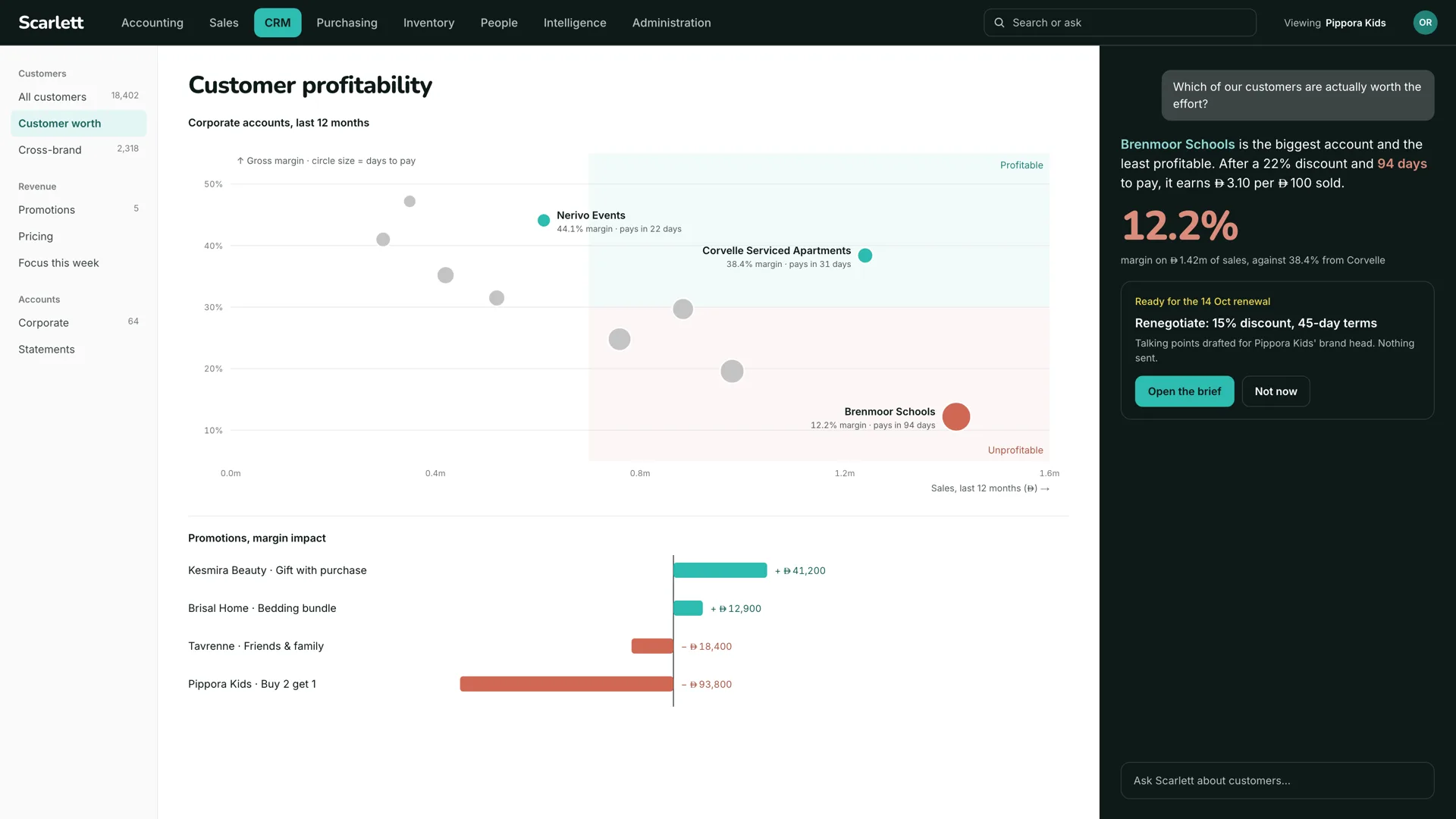
Customers, quotes, orders and invoices, credit notes and the ageing that follows. Sales knows which accounts are worth the effort: the assistant plots margin against days to pay, names the biggest account that is also the least profitable, and drafts the renewal brief before the date.
- Parties
- Customers, prospects and contacts, one record each, shared with every module.
- Quotes
- Commercial proposals with versions, sent and accepted from the record.
- Sales orders
- Orders from accepted quotes, through to delivery and invoice.
- Shipments
- Delivery notes: what left the warehouse against which order.
- Contracts and subscriptions
- Recurring services billed on their own schedule.
- Interventions
- On-site work recorded against the customer and the contract.
- Tickets
- Issues and requests with an owner, a stage and a history.
- Knowledge base
- Answers the team and the assistant read from the same place.
- Partnerships
- Partner agreements and their terms.
Purchasing and suppliers
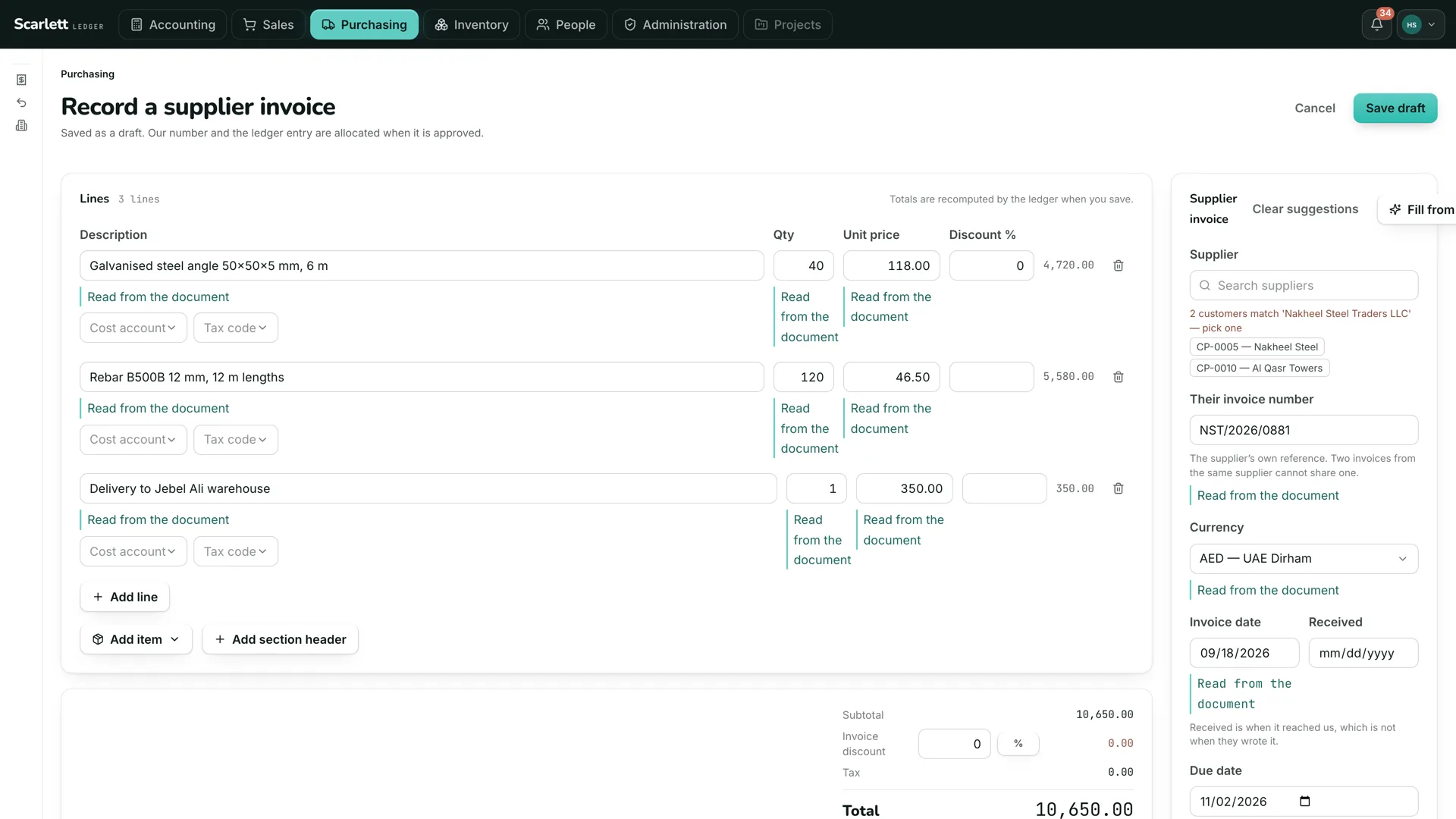
Suppliers and their invoices, read straight from the PDF into a draft with every field marked with where it came from. Approval before posting, payables ageing, and a payment batch prepared for a human checker to review and release.
- Suppliers
- Supplier records with terms, bank details on file and a log of every change to them.
- Supplier quotes
- Request and compare prices before ordering.
- Purchase orders
- Raised under the agreed limits, approved before they go.
- Receptions
- Goods received against the order; short and over deliveries flagged.
- Supplier invoices
- Read from the PDF, matched to order and receipt, approved before posting.
- Incoterms
- Delivery terms carried on every order and shipment.
Stock and items
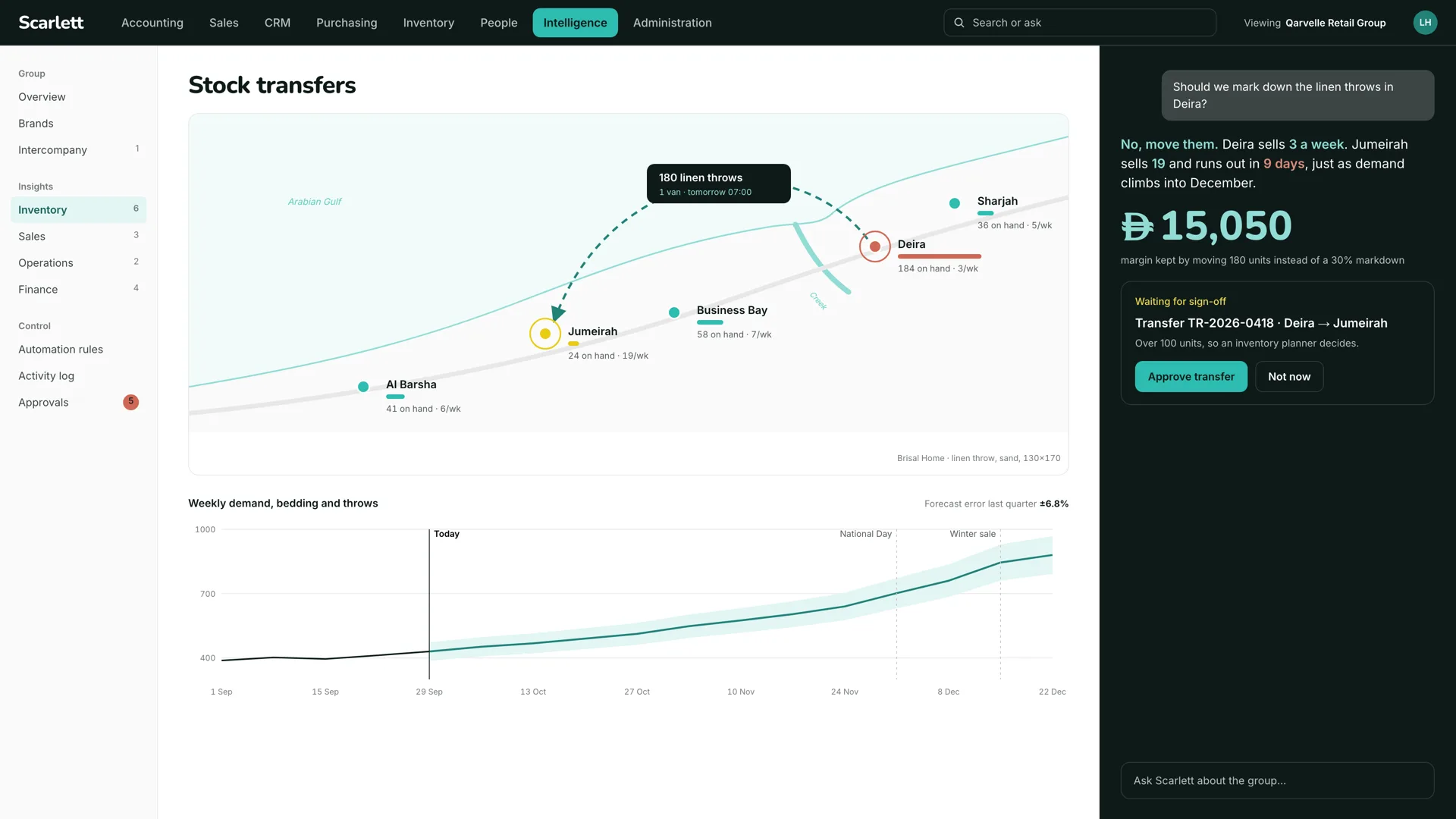
Items, locations and movements, with stock on hand derived from the movements rather than stored. A transfer is proposed before a store runs out, a reorder is raised under the agreed limit, and the inventory control account agrees with the count on the shelf.
- Items and services
- The catalogue: prices, descriptions, units and tax codes.
- Stock
- Locations and movements, with on-hand derived from the movements.
- Lots and serial numbers
- Identity and expiry per unit, where it matters.
- Variants
- Size, colour and other axes on one item.
- Barcodes
- Barcode and QR labels, scanned on receipt and issue.
Manufacturing
Bills of materials and work orders. Components are issued from stock, finished goods come back into it, and the cost travels with them into the ledger, so the margin on a finished item is a fact rather than an estimate.
- Bills of materials
- Components and labour per finished item.
- Manufacturing orders
- Issue components, receive finished goods, carry the cost through.
- Workstations
- Capacity, and where the work happens.
Finance
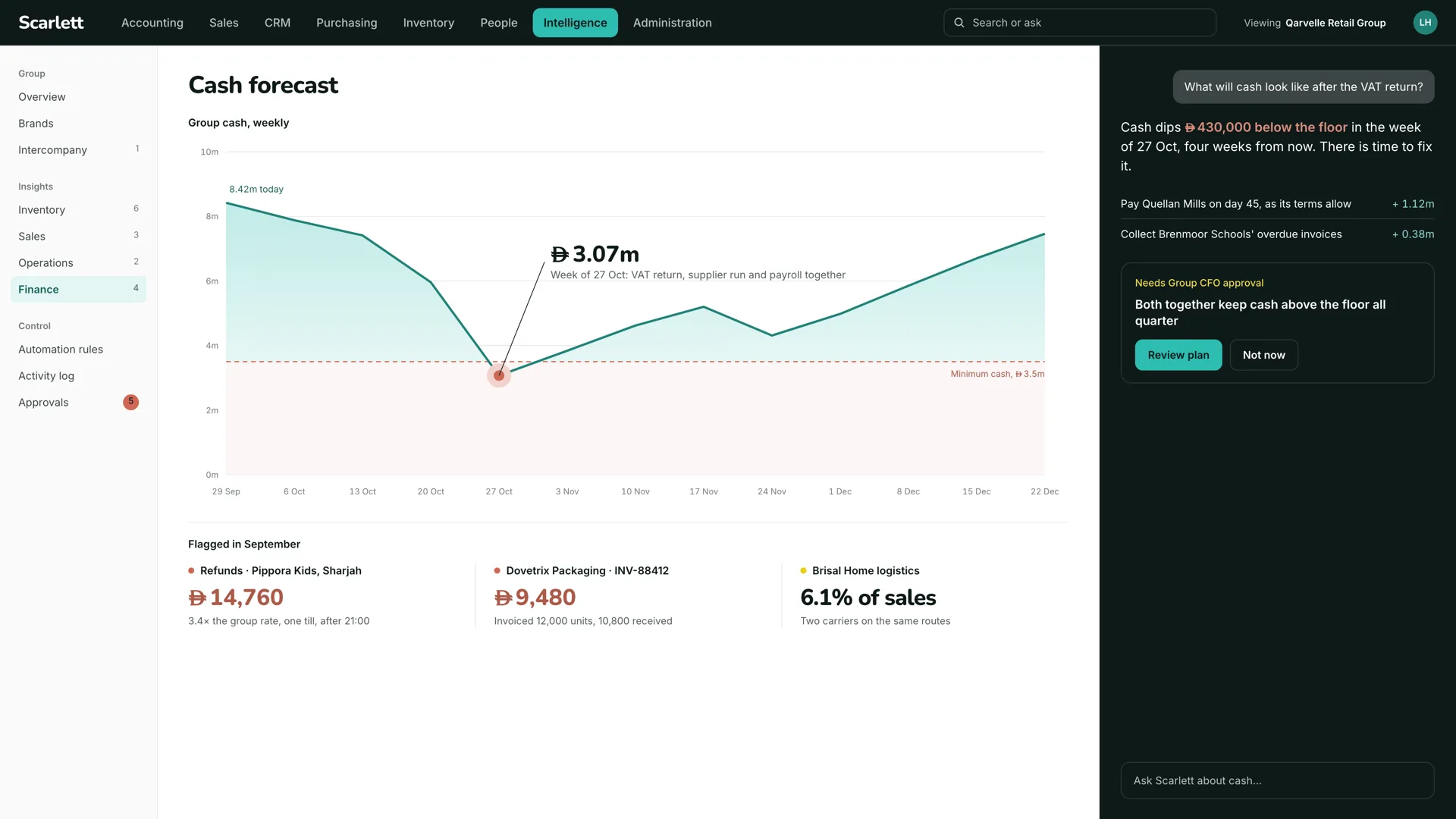
Double-entry books with every rule enforced in the database, UAE VAT, multi-currency, fixed assets and budgets. Cash is forecast week by week, and a supplier payment is timed as the terms allow, so the balance stays above its floor in the week that matters.
- Invoices and credit notes
- Customer and supplier, gapless numbers, ready for e-invoicing.
- Accounting
- Double-entry ledger, journals, periods, year-end close and exports.
- Banks and cash
- Accounts, statements imported and matched to open documents.
- Payment batches
- Supplier and salary batches with the bank file (WPS for salaries), released by a checker.
- Direct debits
- Collection orders against customer mandates.
- Taxes and charges
- VAT returns, corporate tax, social and statutory charges.
- Salaries
- Payroll postings and payslips.
- Loans
- Loan schedules and their interest.
- Donations
- For associations and non-profits.
- Margins
- Margin by item, customer and period.
- Multi-currency
- Foreign-currency documents, realised and unrealised exchange differences.
- Fixed assets
- The register and its depreciation.
- Budgets
- Budget against actual by account and dimension.
- Reports
- Turnover, journals and ageing read straight from the documents, at any date.
Projects
Cost, revenue and time by project, against the budget it was won on. Purchases, expenses and hours are charged to the project they belong to, and the margin on each is read while it can still be changed rather than after the final invoice.
- Projects and leads
- Opportunities and projects; any document can be assigned to one.
- Tasks and time
- Hours charged to the project they belong to.
- Events and agenda
- Meetings, calls and automatic events on the record.
- Resources
- Rooms, vehicles and equipment booked against events.
- Event organisation
- Events with attendees and bookings.
People
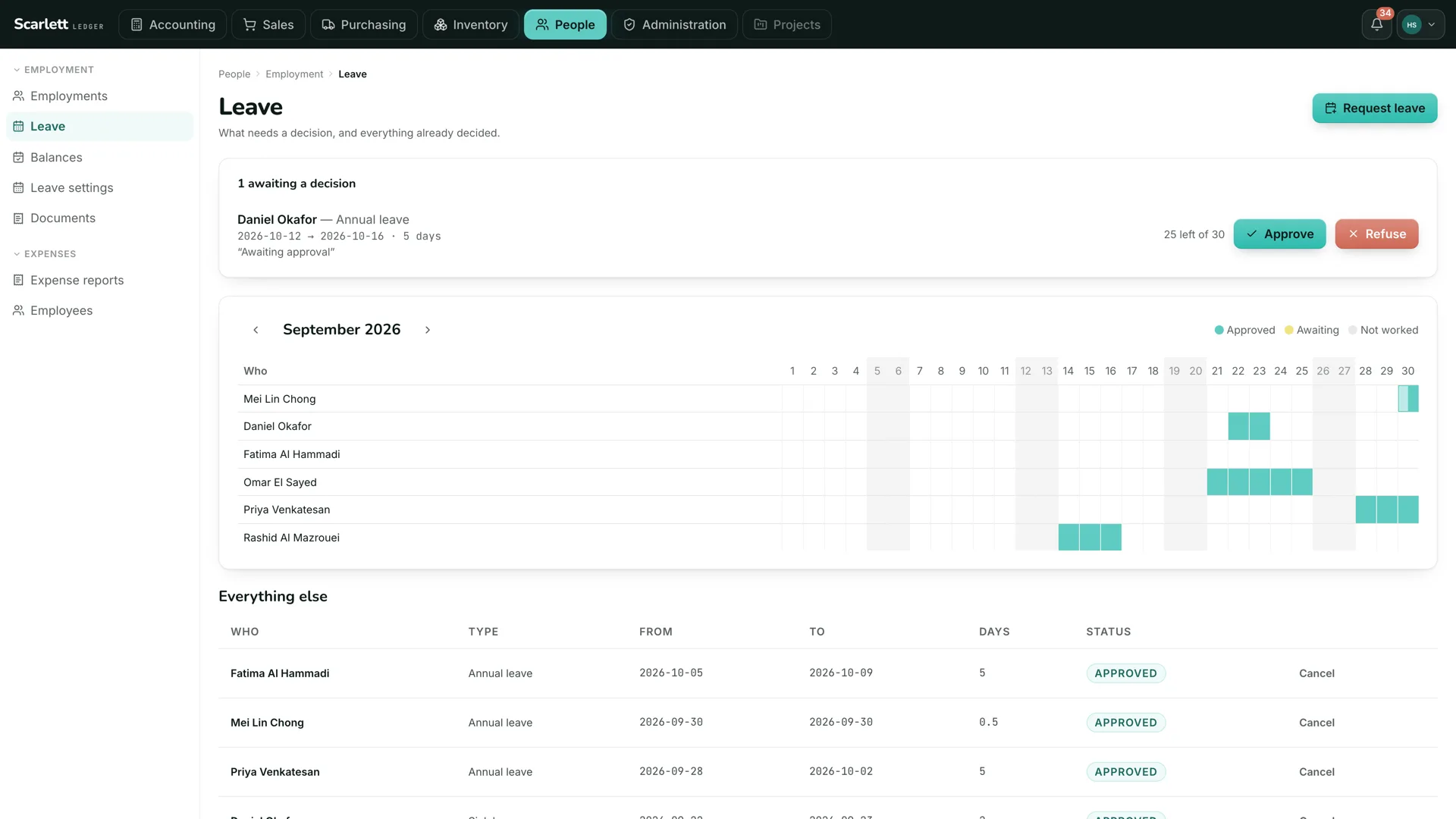
Employees are parties the ledger already knows, so nobody is entered twice. Leave with a decision, expense claims approved by somebody other than the claimant, and documents that expire, such as visas and labour cards, raised before they do.
- Users and groups
- Who can sign in, and what each group may do.
- Employees
- Employment records, contracts, departments, skills and interviews.
- Leave
- Requests, balances and decisions.
- Expense claims
- Submitted by one person, approved by another.
- Recruitment
- Positions and candidates.
- Members
- Association members and their memberships.
- Expiring documents
- Visas, labour cards and passports, raised before they expire.
Documents
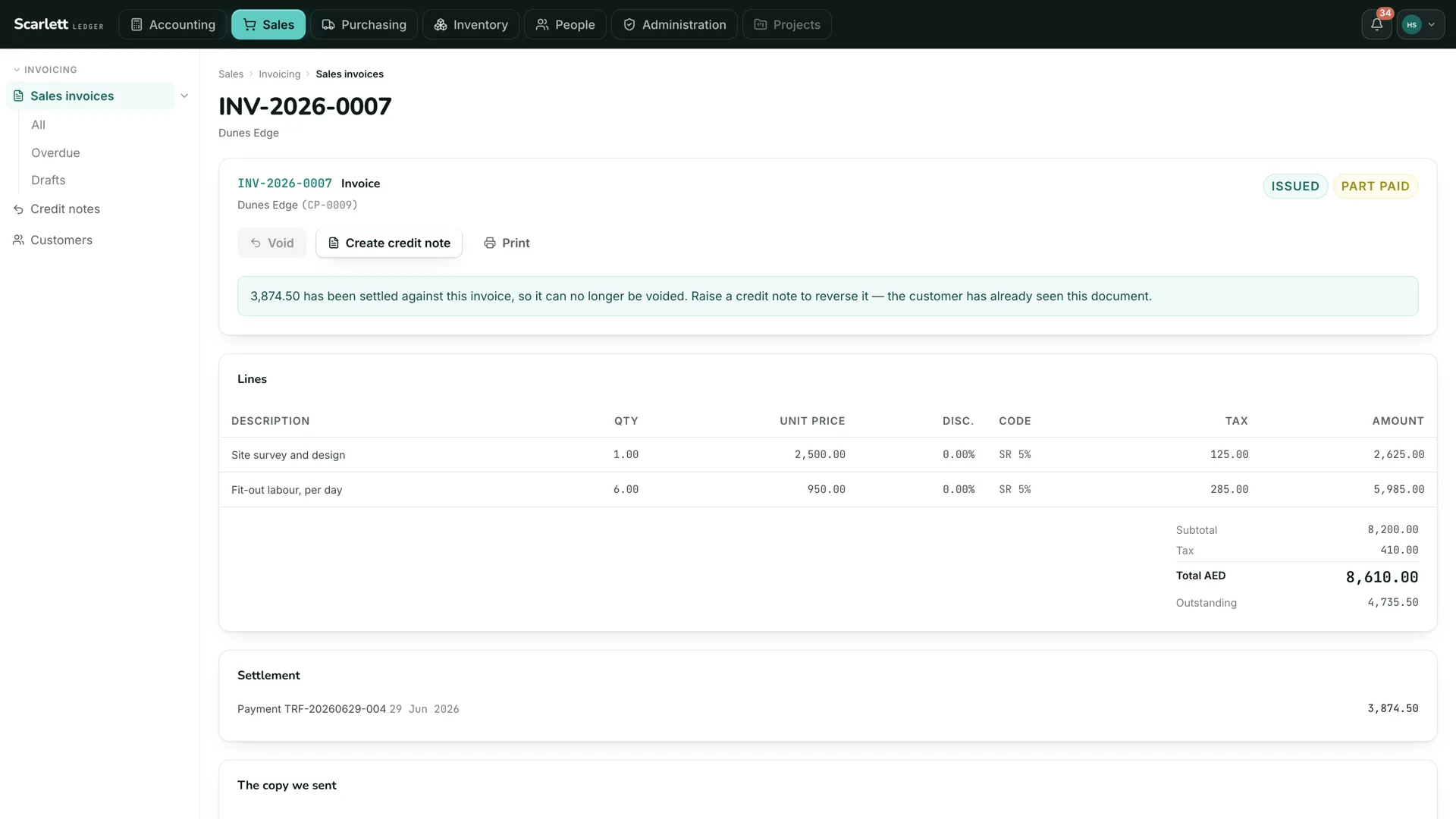
Every document lives on the record it belongs to, with a checksum and a retention date. The copy the customer was sent is kept exactly as sent, the supplier’s PDF stays attached to the invoice it became, and the assistant reads from the same place people do.
- Document management
- Every generated or stored document filed on its record, shared when needed.
- Attachments
- A checksum and a retention date on each file.
- Tags and categories
- On items, parties, contacts and members.
- Document sections
- Title and subtotal lines on quotes, orders and invoices.
- Rich text
- Formatted descriptions and notes on documents.
- Network drive
- Documents reachable as a WebDAV share.
Front desk and portals
Where customers, suppliers and partners meet the system without an account on it: a touchscreen sale in a shop, a portal that shows a customer their own invoices, a payment page linked to an order, a survey sent after the job.
- Point of sale
- Touchscreen sale for shops, cafés and restaurants.
- Web portal
- Customers, suppliers and partners see their own documents.
- Online payments
- A card payment page linked to an invoice or an order.
- Surveys and polls
- Votes, polls and surveys.
- Websites
- A public site served from the same system, edited in place.
- News feeds
- Feeds shown on the home page.
System
The machinery every module shares: workflow between them, imports and exports, scheduled work, an unalterable log of what happened, data privacy under the UAE law, and the assistant under the organisation’s own permissions.
- Workflow
- Automatic creation and status changes between modules.
- Imports and exports
- Assisted, with bad rows handed back.
- Scheduled jobs
- Recurring work with a record of each run.
- Unalterable log
- A chained, read-only log of business events, exportable.
- Data privacy
- Retention, deletion and consent under the UAE data protection law.
- Assistant
- The AI features, under the organisation’s permissions and rules.
- Shortcuts
- Bookmarks to the pages a person uses most, always to hand.
- Module builder
- A low-code tool for building a module of your own.
Sales and customers
Customers, quotes, orders and invoices, credit notes and the ageing that follows. Sales knows which accounts are worth the effort: the assistant plots margin against days to pay, names the biggest account that is also the least profitable, and drafts the renewal brief before the date.
- Parties
- Customers, prospects and contacts, one record each, shared with every module.
- Quotes
- Commercial proposals with versions, sent and accepted from the record.
- Sales orders
- Orders from accepted quotes, through to delivery and invoice.
- Shipments
- Delivery notes: what left the warehouse against which order.
- Contracts and subscriptions
- Recurring services billed on their own schedule.
- Interventions
- On-site work recorded against the customer and the contract.
- Tickets
- Issues and requests with an owner, a stage and a history.
- Knowledge base
- Answers the team and the assistant read from the same place.
- Partnerships
- Partner agreements and their terms.
Purchasing and suppliers
Suppliers and their invoices, read straight from the PDF into a draft with every field marked with where it came from. Approval before posting, payables ageing, and a payment batch prepared for a human checker to review and release.
- Suppliers
- Supplier records with terms, bank details on file and a log of every change to them.
- Supplier quotes
- Request and compare prices before ordering.
- Purchase orders
- Raised under the agreed limits, approved before they go.
- Receptions
- Goods received against the order; short and over deliveries flagged.
- Supplier invoices
- Read from the PDF, matched to order and receipt, approved before posting.
- Incoterms
- Delivery terms carried on every order and shipment.
Stock and items
Items, locations and movements, with stock on hand derived from the movements rather than stored. A transfer is proposed before a store runs out, a reorder is raised under the agreed limit, and the inventory control account agrees with the count on the shelf.
- Items and services
- The catalogue: prices, descriptions, units and tax codes.
- Stock
- Locations and movements, with on-hand derived from the movements.
- Lots and serial numbers
- Identity and expiry per unit, where it matters.
- Variants
- Size, colour and other axes on one item.
- Barcodes
- Barcode and QR labels, scanned on receipt and issue.
Manufacturing
Bills of materials and work orders. Components are issued from stock, finished goods come back into it, and the cost travels with them into the ledger, so the margin on a finished item is a fact rather than an estimate.
- Bills of materials
- Components and labour per finished item.
- Manufacturing orders
- Issue components, receive finished goods, carry the cost through.
- Workstations
- Capacity, and where the work happens.
Finance
Double-entry books with every rule enforced in the database, UAE VAT, multi-currency, fixed assets and budgets. Cash is forecast week by week, and a supplier payment is timed as the terms allow, so the balance stays above its floor in the week that matters.
- Invoices and credit notes
- Customer and supplier, gapless numbers, ready for e-invoicing.
- Accounting
- Double-entry ledger, journals, periods, year-end close and exports.
- Banks and cash
- Accounts, statements imported and matched to open documents.
- Payment batches
- Supplier and salary batches with the bank file (WPS for salaries), released by a checker.
- Direct debits
- Collection orders against customer mandates.
- Taxes and charges
- VAT returns, corporate tax, social and statutory charges.
- Salaries
- Payroll postings and payslips.
- Loans
- Loan schedules and their interest.
- Donations
- For associations and non-profits.
- Margins
- Margin by item, customer and period.
- Multi-currency
- Foreign-currency documents, realised and unrealised exchange differences.
- Fixed assets
- The register and its depreciation.
- Budgets
- Budget against actual by account and dimension.
- Reports
- Turnover, journals and ageing read straight from the documents, at any date.
Projects
Cost, revenue and time by project, against the budget it was won on. Purchases, expenses and hours are charged to the project they belong to, and the margin on each is read while it can still be changed rather than after the final invoice.
- Projects and leads
- Opportunities and projects; any document can be assigned to one.
- Tasks and time
- Hours charged to the project they belong to.
- Events and agenda
- Meetings, calls and automatic events on the record.
- Resources
- Rooms, vehicles and equipment booked against events.
- Event organisation
- Events with attendees and bookings.
People
Employees are parties the ledger already knows, so nobody is entered twice. Leave with a decision, expense claims approved by somebody other than the claimant, and documents that expire, such as visas and labour cards, raised before they do.
- Users and groups
- Who can sign in, and what each group may do.
- Employees
- Employment records, contracts, departments, skills and interviews.
- Leave
- Requests, balances and decisions.
- Expense claims
- Submitted by one person, approved by another.
- Recruitment
- Positions and candidates.
- Members
- Association members and their memberships.
- Expiring documents
- Visas, labour cards and passports, raised before they expire.
Documents
Every document lives on the record it belongs to, with a checksum and a retention date. The copy the customer was sent is kept exactly as sent, the supplier’s PDF stays attached to the invoice it became, and the assistant reads from the same place people do.
- Document management
- Every generated or stored document filed on its record, shared when needed.
- Attachments
- A checksum and a retention date on each file.
- Tags and categories
- On items, parties, contacts and members.
- Document sections
- Title and subtotal lines on quotes, orders and invoices.
- Rich text
- Formatted descriptions and notes on documents.
- Network drive
- Documents reachable as a WebDAV share.
Front desk and portals
Where customers, suppliers and partners meet the system without an account on it: a touchscreen sale in a shop, a portal that shows a customer their own invoices, a payment page linked to an order, a survey sent after the job.
- Point of sale
- Touchscreen sale for shops, cafés and restaurants.
- Web portal
- Customers, suppliers and partners see their own documents.
- Online payments
- A card payment page linked to an invoice or an order.
- Surveys and polls
- Votes, polls and surveys.
- Websites
- A public site served from the same system, edited in place.
- News feeds
- Feeds shown on the home page.
System
The machinery every module shares: workflow between them, imports and exports, scheduled work, an unalterable log of what happened, data privacy under the UAE law, and the assistant under the organisation’s own permissions.
- Workflow
- Automatic creation and status changes between modules.
- Imports and exports
- Assisted, with bad rows handed back.
- Scheduled jobs
- Recurring work with a record of each run.
- Unalterable log
- A chained, read-only log of business events, exportable.
- Data privacy
- Retention, deletion and consent under the UAE data protection law.
- Assistant
- The AI features, under the organisation’s permissions and rules.
- Shortcuts
- Bookmarks to the pages a person uses most, always to hand.
- Module builder
- A low-code tool for building a module of your own.
From answering questions to doing the work.
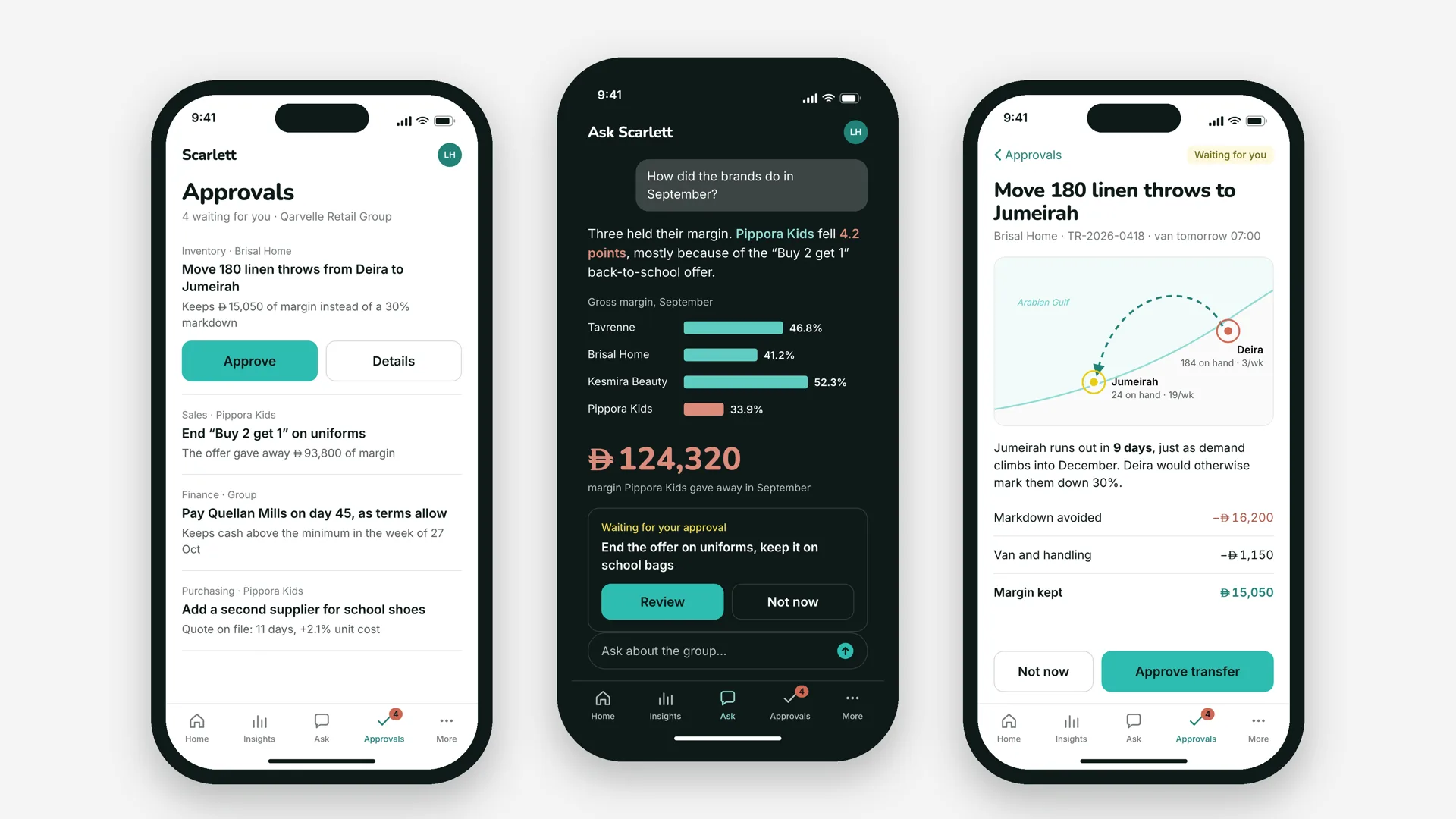
The assistant works with the company’s live data, inside the permissions each user already has. Ask it a question, and it answers from the records. Ask it to prepare something, and it prepares it for the person who is allowed to decide.
- Ask in plain language
- Which customers are worth the effort? Why did margin fall in September? Which store runs out first? The answer comes from the ledger, the stock and the sales, with the figures beside it.
- Surface what needs attention
- Overdue invoices, low stock, a delivery short of what was invoiced, cash running below its floor in a given week. Each is raised with the reason and the number behind it.
- Prepare the routine work
- A stock transfer between stores, a reorder under the agreed limit, an outbound payment batch, a query to a supplier. Prepared and queued for review, within the permissions the user holds, and never released on its own.
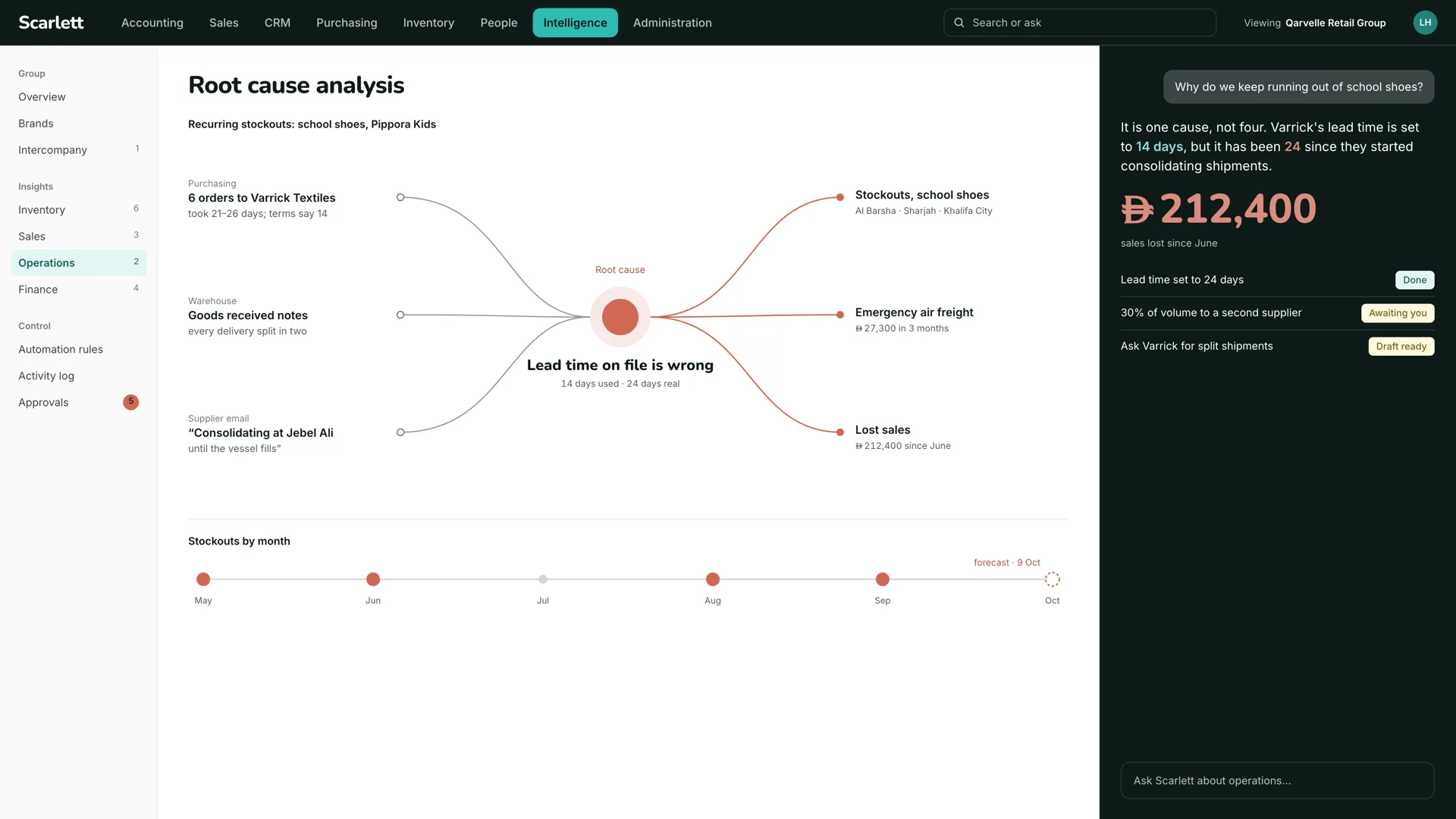
AI prepares the work. People remain responsible for the decisions.
That distinction is the centre of the platform. The assistant cannot bypass user permissions, credit limits, minimum margins or required approvals. Payments, credit notes, deletions and permission changes need a person to confirm them.
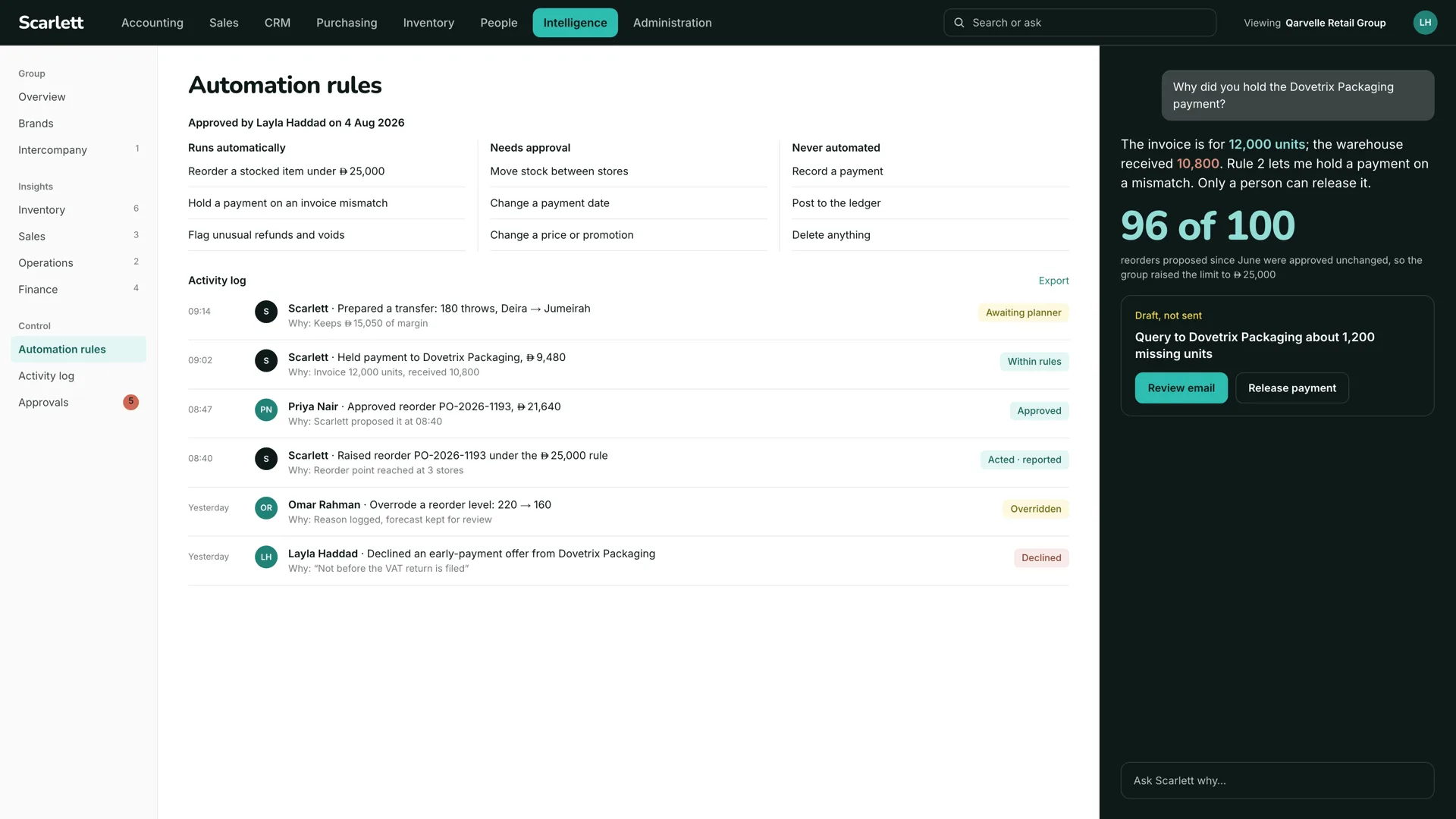
Runs automatically
- Reorder a stocked item under the agreed limit
- Hold a payment on an invoice mismatch
- Flag unusual refunds and voids
Needs approval
- Move stock between stores
- Change a payment date
- Change a price or promotion
Never automated
- Record a payment
- Post to the ledger
- Delete anything
The lines between the three columns are the organisation’s own rules, approved by a named person on a named date, and every action the assistant takes is logged with its reason.
Payments: prepared by the assistant, released by a checker
Scarlett prepares the batch and flags what a careful accounts clerk would notice: an invoice that looks like one already paid, a supplier whose bank details changed since the last run. An authorised human checker then reviews the batch and releases it. The assistant cannot.
The same holds on a phone. Approvals reach the person who owns them, with the reason and the number, and nothing moves until they say so.
AI, without being locked to one AI company.
The business chooses which model powers the assistant, and can change it later without changing the system, the records or the workflows underneath.
- Claude
- Anthropic
- Gemini
- OpenAI
- GPT models
- Falcon
- TII Abu Dhabi, open weights
- Other open-weight models
- on infrastructure you control
For organisations with stricter data requirements, the assistant can run on controlled infrastructure using an open-weight model, so no record leaves the building. And a business can run Scarlett with no assistant at all.
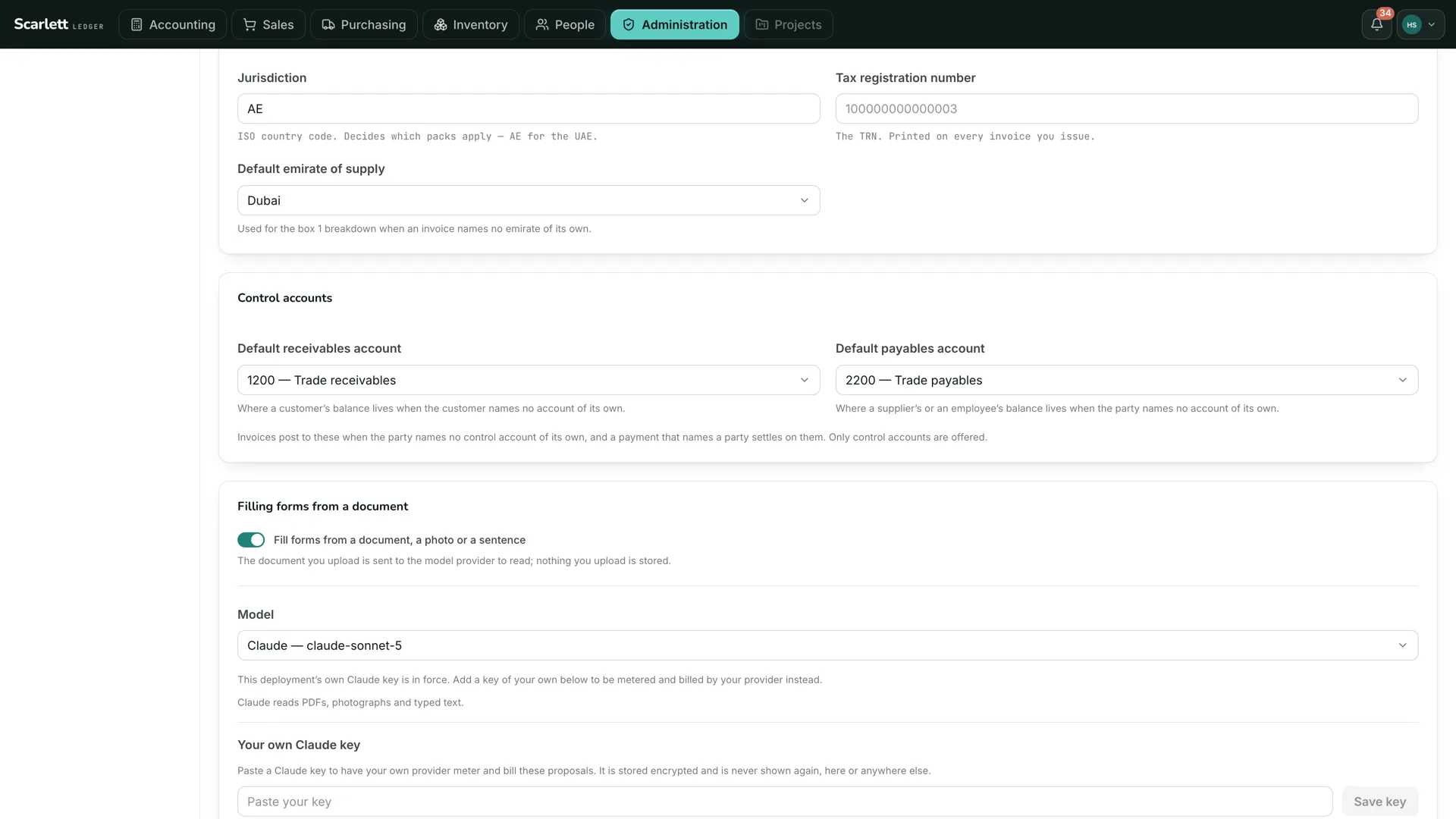
Underneath, a ledger that cannot be wrong.
Everything the assistant reads and prepares rests on double-entry books where each rule is enforced in the database itself. An entry balances or it does not exist. A posted entry is never rewritten. Numbers are gapless. Money is never a floating-point value.
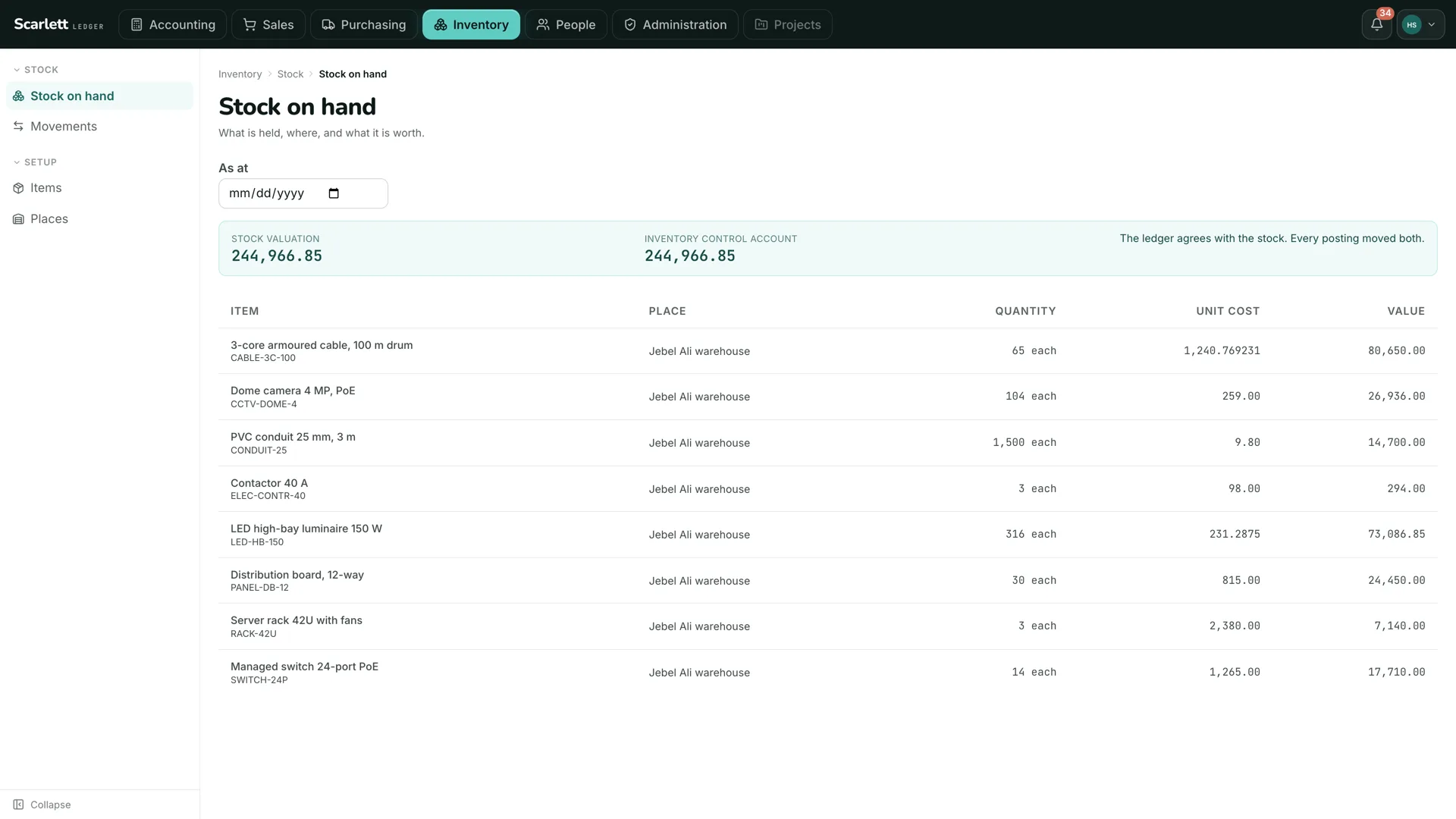
Built around the way the business actually works.
Scarlett is configured around the organisation’s own processes rather than forcing it into a fixed workflow.
- Configured, not customised
- Fields, documents, numbering, approval stages, permissions and terminology are set around the organisation. Roles are built from a catalogue of permissions, so what a role can do is a list you can read.
- A module where the industry needs one
- Where an industry needs more than the standard capabilities, Hashinclude builds it as a dedicated module inside the system, rather than leaving the process to spreadsheets and disconnected tools.
- Industries
- Construction, manufacturing, trading, field services, professional services and retail.
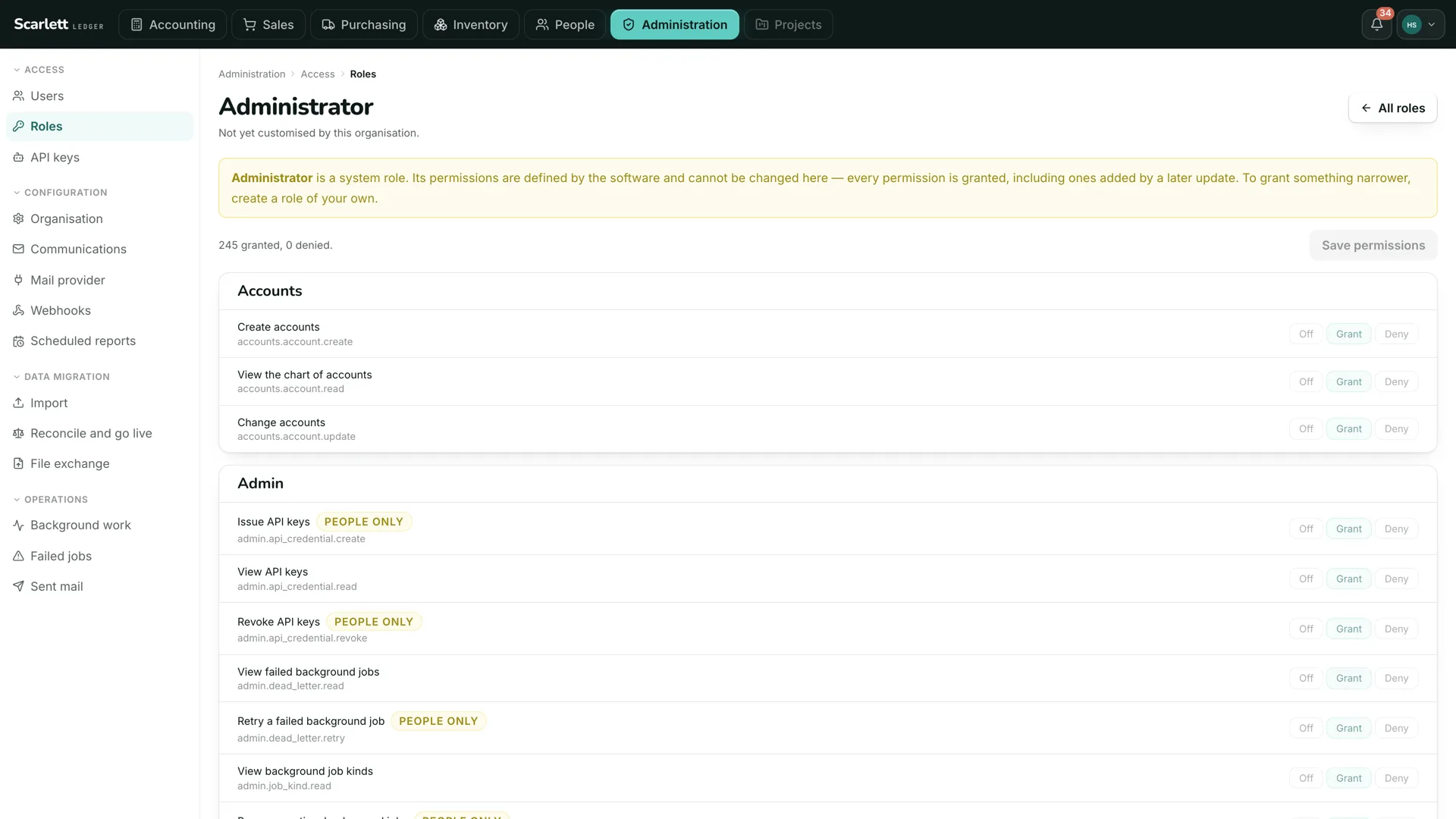
The role editor. Permissions grouped by module. The ones only a person may exercise are marked, and no assistant can hold them.
Your data, in your jurisdiction, under your control.
Scarlett is a single-tenant system. Each company has its own dedicated system, database, encryption keys and backups, separated from every other customer’s.

- Deployed where you need it
- In the jurisdiction the customer requires, including in-country UAE deployment. Nightly backups, scheduled restore testing, and administrative access that is time-limited and logged.
- Never used for training
- Customer records are not used to train an AI model. What reaches a model is what the assistant needs for the task in hand, and with an open-weight model on your own infrastructure, nothing leaves at all.
- Connects rather than replaces
- REST APIs, webhooks, scheduled data transfers, email capture and single sign-on, so existing applications, payment systems, storefronts and logistics platforms stay part of the stack.
A gradual shift, not a system overhaul.
Scarlett is introduced progressively. The first operational area typically goes live around the second week, and the rest follow at the pace the business sets.
- Week 1
Your instance, your data
The dedicated instance is created and existing data is loaded into it.
- Week 1 to 2
Your processes
Business processes, permissions and approval stages are configured around the organisation.
- Around week 2
First area live
The first operational area goes live with the people who run it.
- Then
Progressively
Purchasing, stock, invoicing, accounts and projects are introduced one after another.
The founder on Scarlett
“Businesses don’t need another AI tool sitting beside the systems they already use. They need technology that understands how the business actually operates and can help move that work forward. Scarlett is built around that idea, connecting the business first, putting AI inside the workflow, and making sure automation remains subject to the company’s own permissions, processes and people.”
See it with your own numbers.
A demonstration takes an hour. Bring a month of invoices and a stock list, and ask Scarlett what it sees.